From Robotic Replies to Cougar Clarity
Productivity
Huyen Vu, Functional Analyst
AI Solutions
Tools
Copilot, Copilot Studio
Problem
As Shasta expanded across departments, reviewing and rewriting chatbot responses manually became time-consuming and difficult to scale. Maintaining a consistent, friendly voice while improving clarity required repeated edits and feedback, slowing down the process and creating inconsistent user experiences.
Solution
A Copilot-powered Shasta Chatbot Writing Buddy was created to help refine chatbot responses directly within Microsoft Teams. The tool improves tone, grammar, flow, and clarity while preserving Shasta's authentic voice, enabling departments to produce consistent, high-quality responses more efficiently with less manual effort.
As Shasta Chatbot expanded across departments, I noticed that reviewing and refining chatbot responses one by one was becoming harder to manage.
The challenge was familiar: some chatbot responses were unclear, difficult to follow or too robotic in tone. At first, feedback was handled manually in Excel for each department. That approach worked for a while, but as the chatbot grew, the process became inefficient and difficult to scale.
To solve the problem, I used Copilot to create the Shasta Chatbot Writing Buddy, an AI-powered agent designed to help craft smarter, faster and more confident Shasta Chatbot responses using our established Shasta Tone and Voice guidelines, which define how the chatbot should communicate: clear, helpful, empathetic, and student-centered. The agent can be used as an app in Teams, making it accessible in a familiar workspace even for users without a Copilot license.
My goal was to address the problem at its source by improving how responses are generated rather than relying on individual departments to refine them afterward. I focused on making responses easier to understand while preserving Shasta’s friendly, enthusiastic voice. I guided the tool to use clear, simple language and produce a well-structured message with positive guidance and brief context.
Today, the Shasta Chatbot Writing Buddy can fine-tune tone, grammar and flow while keeping Shasta's voice front and center. A response that might have sounded stiff or overly robotic can quickly become clearer, more conversational, and authentically Shasta.
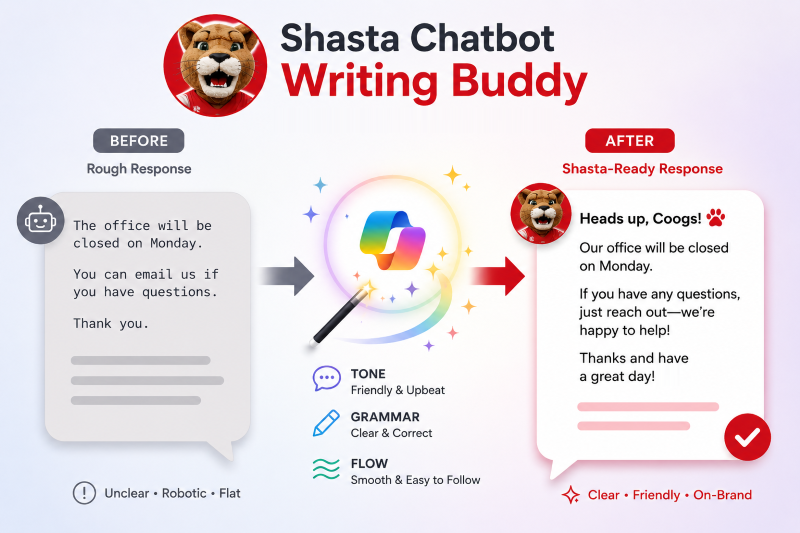
One of the biggest benefits I've seen is the time it saves. Instead of manually rewriting responses or giving the same feedback over and over, departments can use the Writing Buddy to produce more polished responses from the start. That lets us spend less time editing and more time improving the overall chatbot experience.
For me, the value goes beyond efficiency. Consistent, friendly communication helps build trust with the people using Shasta, and it gives departments a simple way to provide a better experience without adding more work.
I hope this example encourages others to think about repetitive tasks in their own work. Sometimes AI doesn't need to solve a huge problem—it just needs to make an everyday task a little easier, a little faster and a little better.
Try It Yourself
Ready to use the Shasta Chatbot Writing Buddy?
Download the Getting Started with the Shasta Chatbot Writing Buddy guide to learn how to install the Copilot agent in Microsoft Teams and start creating clearer, friendlier Shasta responses.
The example, details, and outcomes described in this article were provided by the contributor. AI tools were used to help organize and draft the article, which was reviewed and validated by human staff to ensure accuracy, quality, and appropriate oversight.