Clearing the Inbox Fog with AI
Productivity
Sabrina Mobassirin, Functional Analyst 2
AI Solutions
Tools
Microsoft Copilot Studio and Power Automate
Problem
In Education Innovation & Technology (EIT), the support team receives a high volume of emails each day, making it difficult to quickly see what issues came in, how they were handled, and whether anything needed escalation.
Solution
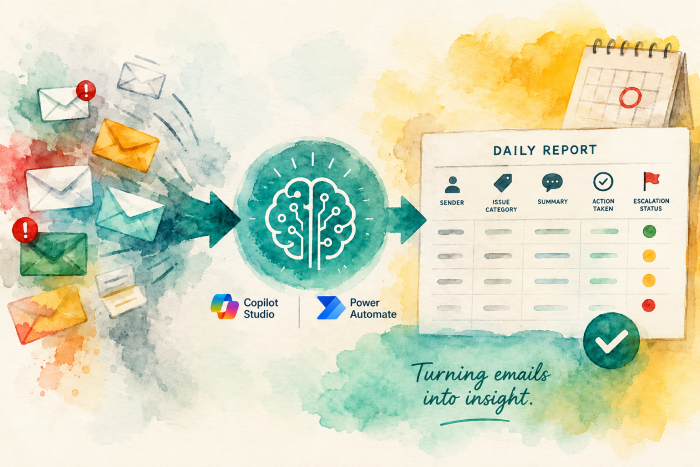
Microsoft Copilot Studio and Power Automate were used to build a custom AI agent that reviews incoming support emails, extracts key details, and organizes them into a structured daily report.
Every busy team has a place where the work piles up.
For the Education Innovation & Technology (EIT) support team, that place was the inbox.
 Each message told part of the story: a request, an issue, a response, an action taken,
a possible escalation. But the full picture was harder to see. To understand what
had come in and what had happened next, team members had to read through email threads,
pull out the important details, and consolidate updates manually.
Each message told part of the story: a request, an issue, a response, an action taken,
a possible escalation. But the full picture was harder to see. To understand what
had come in and what had happened next, team members had to read through email threads,
pull out the important details, and consolidate updates manually.
That work was valuable. It kept the team informed, aligned, and aware of emerging issues. However, manually reviewing and summarizing support emails became increasingly time-consuming as email volume grew. To address this, EIT reached out us to develop an AI agent that automates the initial review process. The agent reads incoming support emails, extracts the key details, and organizes them into clear, actionable summaries, allowing the team to focus on resolving issues instead of sorting through inboxes. It also captures information about resolved and unresolved support issues, creating a growing knowledge base of past tickets that can be referenced to identify trends, surface recurring problems, and accelerate responses to similar requests in the future.
Using Microsoft Copilot Studio, I built a custom AI agent that processes each support email and extracts the most important details: the sender, issue category, summary, action taken, and escalation status. Then, using Power Automate, I connected that agent to a workflow that moves the information into a clean, structured format for a daily report.
One of the most important decisions was how the system handled volume. Rather than processing emails in bulk, the workflow calls the same AI agent individually for each email. That made the process more reliable on high-volume days and helped the solution scale without overwhelming the system.
The result is a timely daily report that turns daily support emails into a clear, reliable snapshot of team activity.
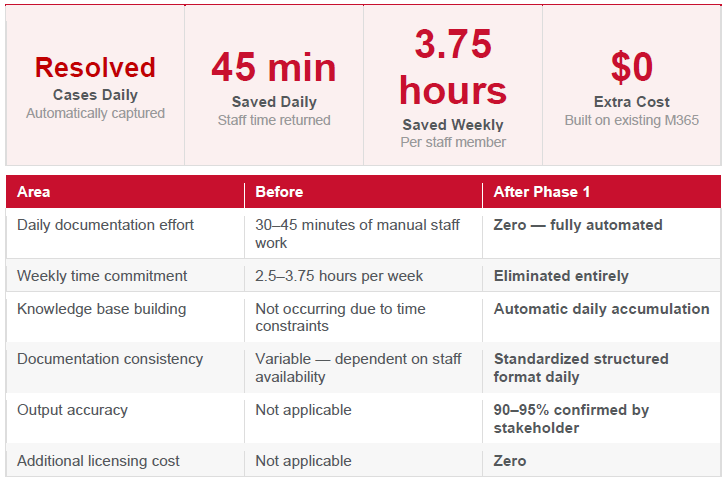 Figure 1.1 Measured outcomes
What once required manual effort from multiple team members now happens automatically each day. The team spends less time drafting updates, chasing information, and consolidating details, while still gaining a clear view of support activity.
The solution also creates a recurring documentation trail. As the project portfolio grows, the report grows with it, without adding more manual work to the team’s plate.
Just as important, this quick win was built using tools the university already pays for: Microsoft Copilot Studio and Power Automate within the Microsoft 365 ecosystem. No additional software cost was required.
For me, the value of this project was that AI helped turn routine communication into something more useful. An inbox became a source of insight, and a manual reporting process became a repeatable workflow the team can rely on.
Try It Yourself
Curious how no-code AI agents work?
Start with the LinkedIn Learning course “Getting Started with Autonomous Agents in Copilot Studio (No Code Required)” to learn how Copilot Studio agents can help simplify workflows, improve productivity, and automate repetitive tasks before building one of your own.
The example, details, and outcomes described in this article were provided by the contributor. AI tools were used to help organize and draft the article, which was reviewed and validated by human staff to ensure accuracy, quality, and appropriate oversight.